Free App
Time Guard — you decide when the phone is open
Your phone should not decide for you when you work, when you are with your family and when you sleep. Time Guard lets you set that in advance in a few plain sentences — and then keeps the decision even when the impulse of the moment says otherwise. A free Android app with no server, no account, no ads, and no internet permission at all. The app's interface is in Hebrew.
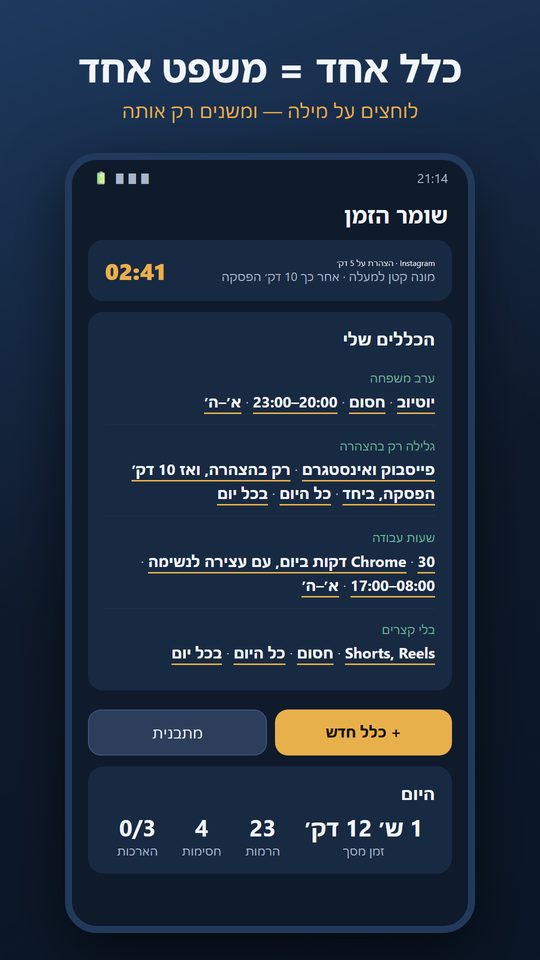
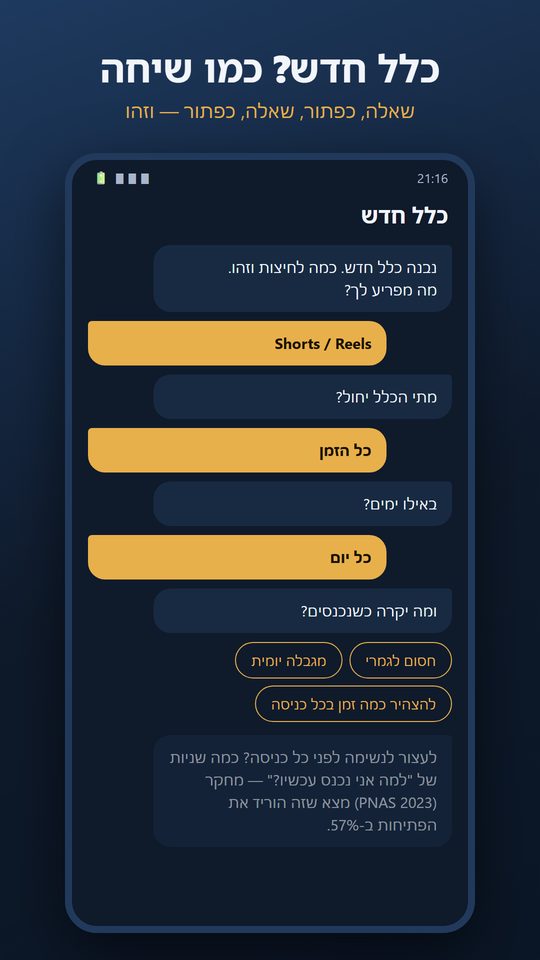
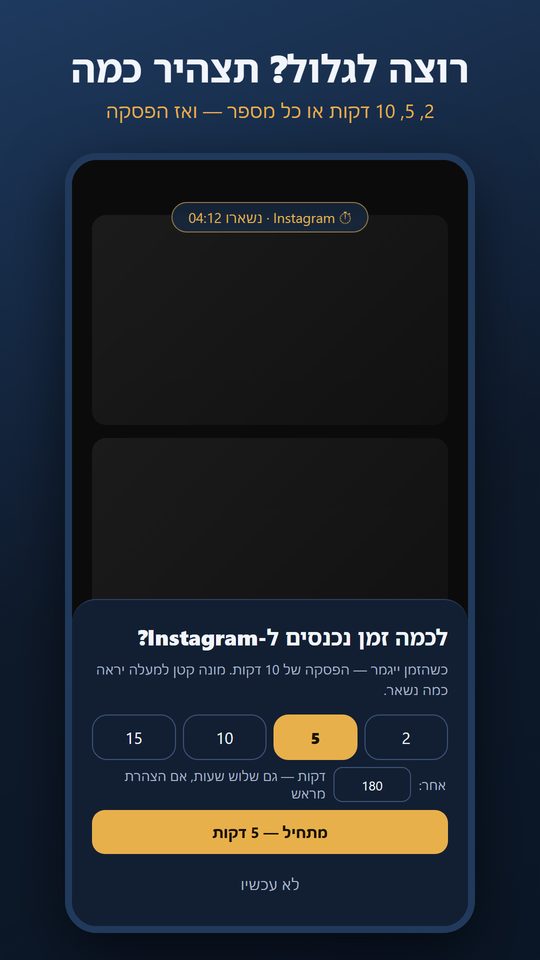
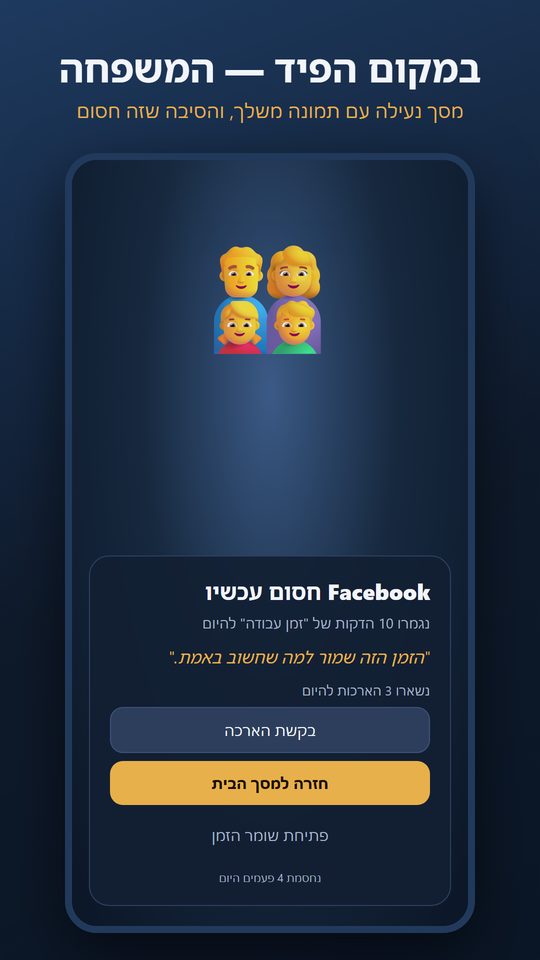
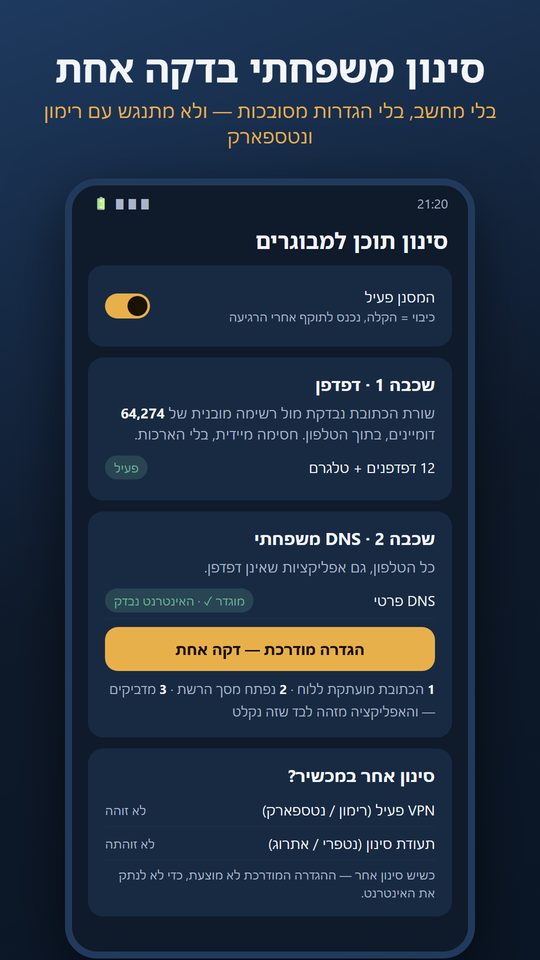
The images are renderings of the version 2 screens (October 2026). The app is in Hebrew.
What is new in version 2
- A rule is one sentence. What (an app, a group, "everything except…", websites, Shorts/Reels) · how (blocked / daily limit / declared session) · when (all day or time ranges) · on which days. On the home screen the rules read as sentences, and tapping a word edits only that word.
- Declared session — a new kind of rule. Every time you enter the app you declare how long: 2, 5, 10, 15 minutes — or any number you type, with no ceiling. Want to burn three hours? Declare it up front. A small, semi-transparent counter at the top of the screen shows what is left, and when time runs out — a break (10 minutes by default). Time is counted only while the app is in the foreground.
- A half-conversational interface. "+ New rule" opens a conversation with buttons: What bothers you? When? Which days? And what happens when you go in? — four taps and the rule is ready. Templates too, such as "scrolling only by declaration".
- A breathing pause per rule (5, 10 or 20 seconds), not one global setting.
- Adult-content filtering with a one-minute guided setup. One button copies the family DNS address, opens the network settings and detects on its own that the setting took. No computer, no commands.
- Coexistence with other filtering systems. The app detects Rimon, Netspark, NetFree and Etrog (an active VPN, filtering certificates, someone else's DNS) — and when they are present it does not offer a setup that could cut off the internet.
What the app does
Rules for apps and websites
For any app, a group of apps, or "everything except…". The same rules for websites in the browser — a whole domain (facebook.com) or just part of it (facebook.com/reel).
Shorts and Reels, separately from the app
YouTube stays open for lessons and lectures — and Shorts are blocked. Facebook and Instagram are limited — and Reels are blocked entirely. A "detection lab" lets you update the detection yourself.
Three ways to limit
Fully blocked, a daily minute budget, or a declared session. A group can share one budget, or each app can be counted on its own.
Your lock screen
When something is blocked, instead of the feed you see a picture you chose — your family, say — and a sentence of your own. You see why it is blocked, how long is left and how many times you were stopped today.
"Cool-down" — the small invention
Tightening takes effect immediately. Loosening — opening something, raising a limit, switching off — only after a wait: X minutes, "until tomorrow morning", or a code someone else holds. The impulse passes; what remains after the wait is probably a real decision.
Extensions with a price
From the lock screen you tap "request extension", wait (and the wait grows with every further request), and get a few minutes. Up to three a day. All configurable.
A breathing pause
A few seconds of "why are you opening this now?" before a limited app, with an open counter and intention chips — "check a message", "something specific", "just scrolling".
More tools
Muting notifications while a rule is active, a grayscale screen (advanced), and statistics: screen time, pick-ups, opens per app, seven days back and a daily summary in the evening.
Adult-content filter
Two layers: in the browser, against a built-in list of more than 64,000 domains checked inside the phone; and device-wide, through a family DNS. No extensions. Telegram signals are detected too.
What the research says — and what made it into the app
The app does not try to "beat" its user. Every mechanism in it rests on a research finding about what actually helps people stop scrolling on autopilot — and on a finding that matters just as much: blind blocking gets bypassed or uninstalled, while friction that respects the user survives over time.
| Finding | Source | In the app |
|---|---|---|
| A short delay plus a "why?" question before opening an app reduced actual openings by 57% after six weeks; in 36% of attempts users closed the app themselves after the interruption. | Grüning, Riedel & Lorenz-Spreen, PNAS 120(8), 2023 — field experiment on the one sec app | The "breathing pause": a question, a countdown, an open counter and intention chips — per rule. |
| Short design frictions reduced opening attempts and led to more intentional openings over time; users take breaks from the interventions and quickly rebound from overuse. | Haliburton et al., CHI 2024 — longitudinal study of 1,039 users over 13 weeks on average | Extensions with a wait instead of a wall; "not now" always available; a cool-down rather than an unbreakable lock. |
| An intervention of ten "nudges" — muting non-essential notifications, grayscale, keeping the phone away — reduced problematic use and screen time and improved sleep quality compared with a control group. | Olson et al., International Journal of Mental Health and Addiction, 2022 — randomised controlled trial, two studies | Mute notifications while a rule is active · grayscale while a rule is active · daily summary. |
| Switching the display to grayscale reduced college students' daily screen time, mainly in browsing and social media. | Holte & Ferraro, The Social Science Journal, 2020 — grayscale experiment | Grayscale as an option (needs a one-time permission from a computer). |
| The "Ulysses contract": a decision made calmly must be protected from the preferences of the moment — like Ulysses asking to be tied to the mast before the Sirens' song. | Elster, Ulysses and the Sirens, Cambridge University Press, 1979 — a foundational idea in behavioural economics | The "cool-down": loosening takes effect only after a wait, until morning, or with a partner code. |
In fairness: these studies show average effects across groups, not a personal guarantee. The app is built so that you can tune it to yourself — and see in the statistics what really works for you.
Privacy — for real
The app has no internet permission at all. No account, no server, no analytics, no ads. Settings, minute counters and the lock-screen image are stored only on the phone, and uninstalling deletes everything. The accessibility service — needed only for websites and Shorts/Reels — reads solely the address bar in browsers and the screen structure in YouTube, Facebook, Instagram and Telegram; the list is locked in code and no other app is read. Without it the app still works, just without websites and short-form video. Full details in the privacy policy (Hebrew).
Frequently asked
Is it for children?
No. Time Guard is a tool for an adult who wants control over their own screen time (18+). It is deliberately not a "parental app": there is no remote management and no reporting to anyone. If you want someone else to hold the key, set a "partner code" in the cool-down settings.
Why does it need an accessibility service?
For two abilities only: knowing which website is open in the browser, and recognising Shorts/Reels inside YouTube, Facebook and Instagram. Android offers no other way to know this. The service is optional, limited to 18 packages locked in code, and a dialog explains exactly what is read before it is enabled.
I use Rimon / Netspark / NetFree. Does it clash?
The lock screens and the browser layer live alongside any filter. The only possible clash is the family DNS against the filter's VPN — so the app detects other filtering and does not offer the guided setup when it is present. We tested this on purpose.
Is there an iPhone version?
No. The app relies on Android capabilities (usage data, overlays, accessibility) that have no open equivalent on iOS.
How do I uninstall?
Like any app. If you set a cool-down, switching off the main toggle takes effect after the wait you chose — that is the point. Uninstalling deletes all data.
Know someone who scrolls more than they want to?
Send them the link. That is all we ask — the app is free and will stay that way.
Time Guard on Google Play